For Organization Administrators

Organization Area: Customize Your Learning Platform

Complete control over your learning platform with department management, user administration, credit and license management, content approvals, and AI-powered recommendations. Customize every aspect of your organization's learning experience.

Department and user management with complete lifecycle control
Grace period configuration for timely learning completion
Assessment assignment with seat allocation tracking
AI-powered content recommendations and approval workflows

Comprehensive Organization Management

Everything you need to customize and control your learning platform. Manage departments, users, assessments, and content with powerful administration tools.

Department Management

Comprehensive department setup with organization mapping, unique department codes, creation and deactivation dates, and real-time status tracking. Manage your organizational structure with complete visibility and control.
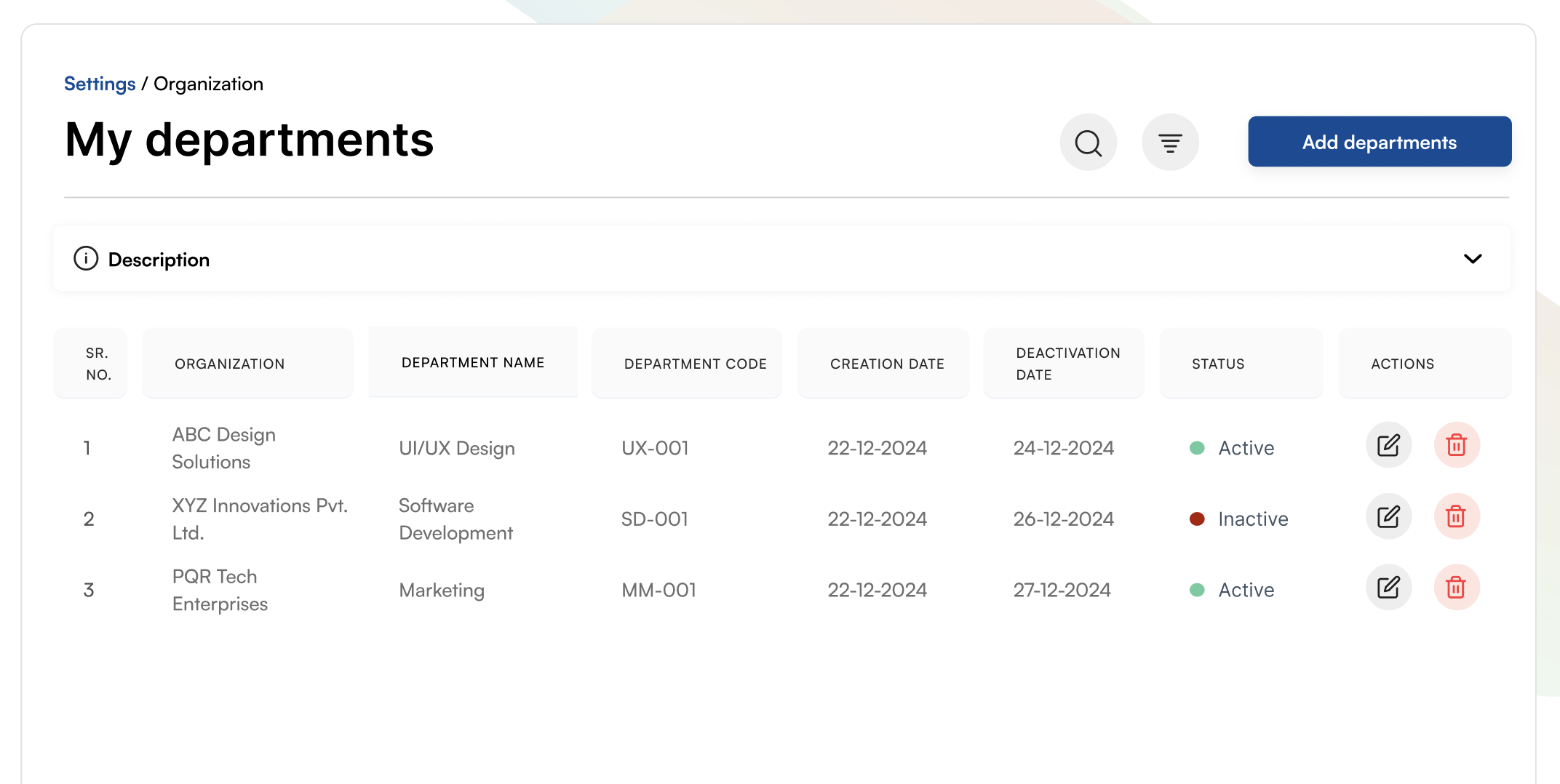
Serial number tracking for each department entry
Organization name mapping per department (ABC Design Solutions, XYZ Innovations Pvt. Ltd., PQR Tech Enterprises)
Department name with descriptive titles (UI/UX Design, Software Development, Marketing)
Unique department codes for easy identification (UX-001, SD-001, MM-001)
Creation date timestamp (22-12-2024) for audit trails
Deactivation date tracking (24-12-2024, 26-12-2024, 27-12-2024) for lifecycle management
Active/Inactive status indicators with color coding (Green: Active, Red: Inactive)
Edit functionality for updating department details
Delete option with confirmation for department removal
Add departments button for quick new entries
Search functionality to find specific departments
Filter options for advanced data views
Collapsible description section for additional context
Settings breadcrumb navigation (Settings / Organization)
My Departments
My Users

User Management

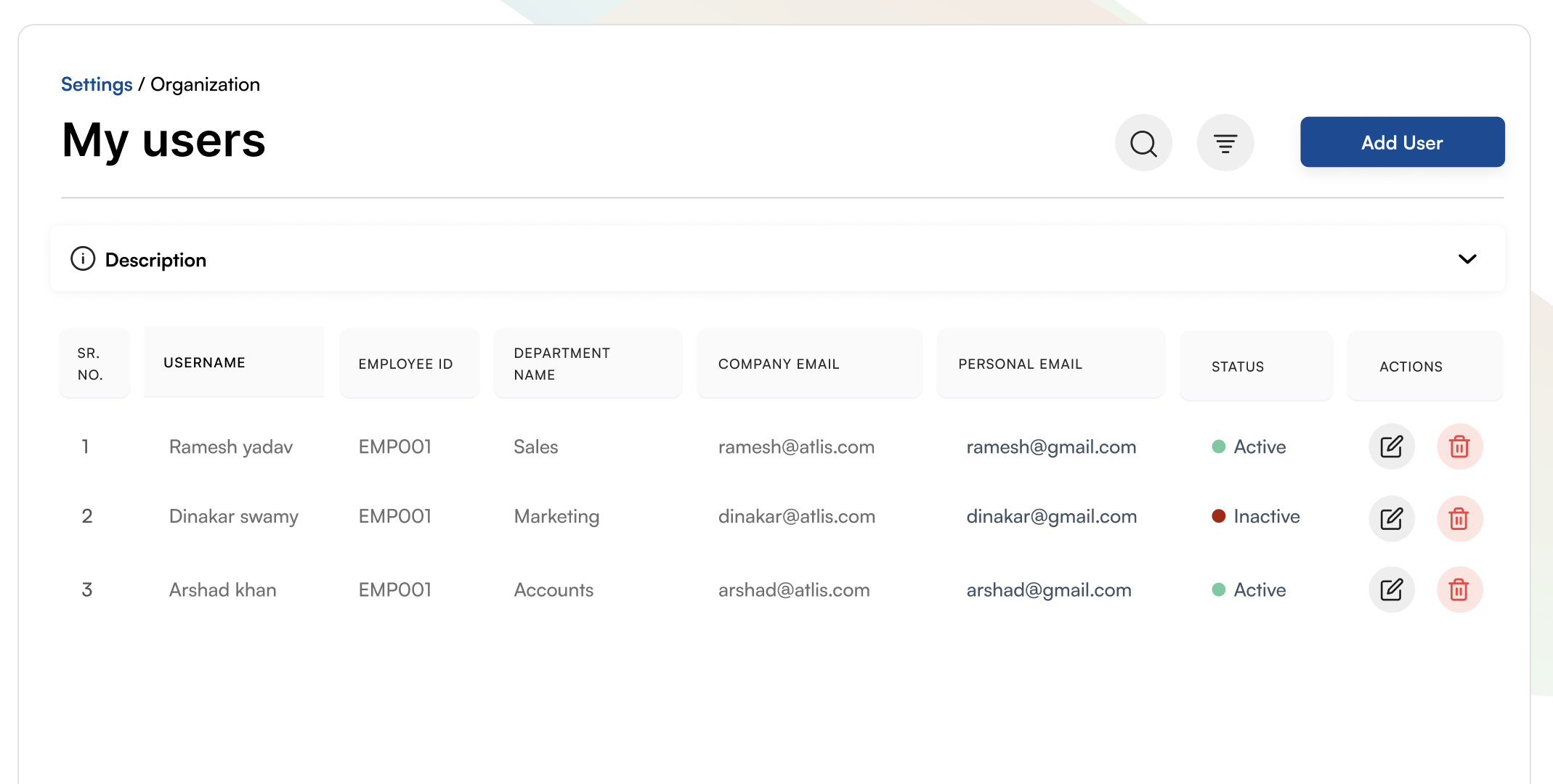
Complete user lifecycle management with employee ID tracking, department assignment, company and personal email management, and status monitoring. Streamline user administration with powerful search and filtering capabilities.

Serial number for each user entry
Username display with full names (Ramesh yadav, Dinakar swamy, Arshad khan)
Employee ID tracking (EMP001) for HR system integration
Department name assignment (Sales, Marketing, Accounts)
Company email for official communications (@atlis.com)
Personal email for backup contact (@gmail.com)
Active/Inactive status with visual indicators (Green: Active, Red: Inactive)
Edit user functionality for profile updates
Delete user option with safety confirmations
Add User button for onboarding new employees
Search functionality across all user fields
Filter options for department, status, and more
Collapsible description for help and guidance
Settings breadcrumb navigation for context
Bulk user operations support

User Grace Period Management

Define grace periods for different assessment types and content with flexible day-based configurations. Set completion timelines for Quiz, Assessment, and Course content to ensure timely learning completion.
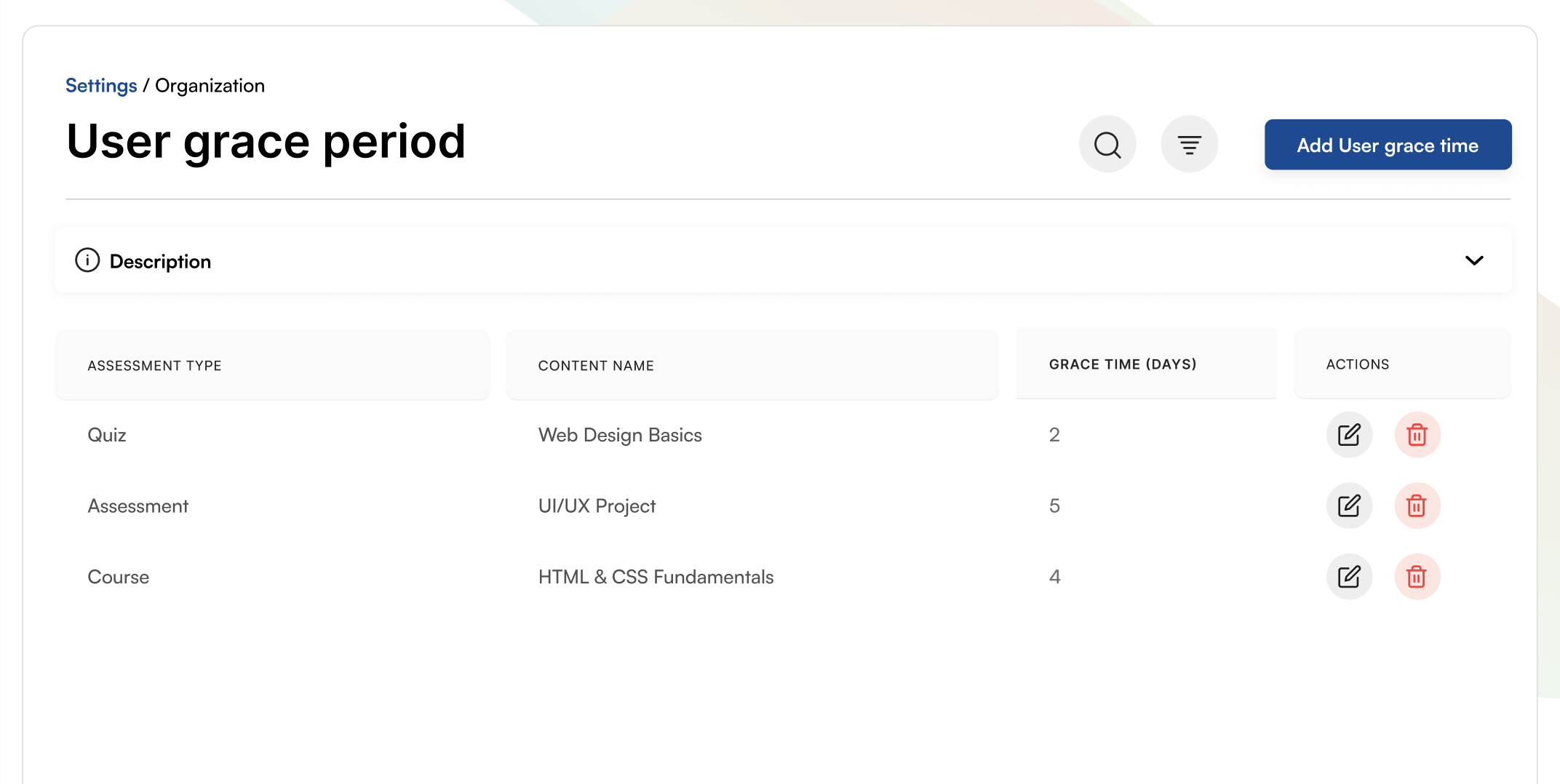
Assessment type categorization (Quiz, Assessment, Course)
Content name display (Web Design Basics, UI/UX Project, HTML & CSS Fundamentals)
Grace time in days with numeric values (2, 5, 4 days)
Edit functionality to adjust grace periods
Delete option to remove grace period rules
Add User grace time button for new rules
Search across assessment types and content
Filter options for organized rule management
Collapsible description section for detailed explanations
Settings breadcrumb for easy navigation
Flexible grace period configuration per content type
Support for different learning material categories
User Grace Period Management
Assigned Assessment Management

Assigned Assessment Management

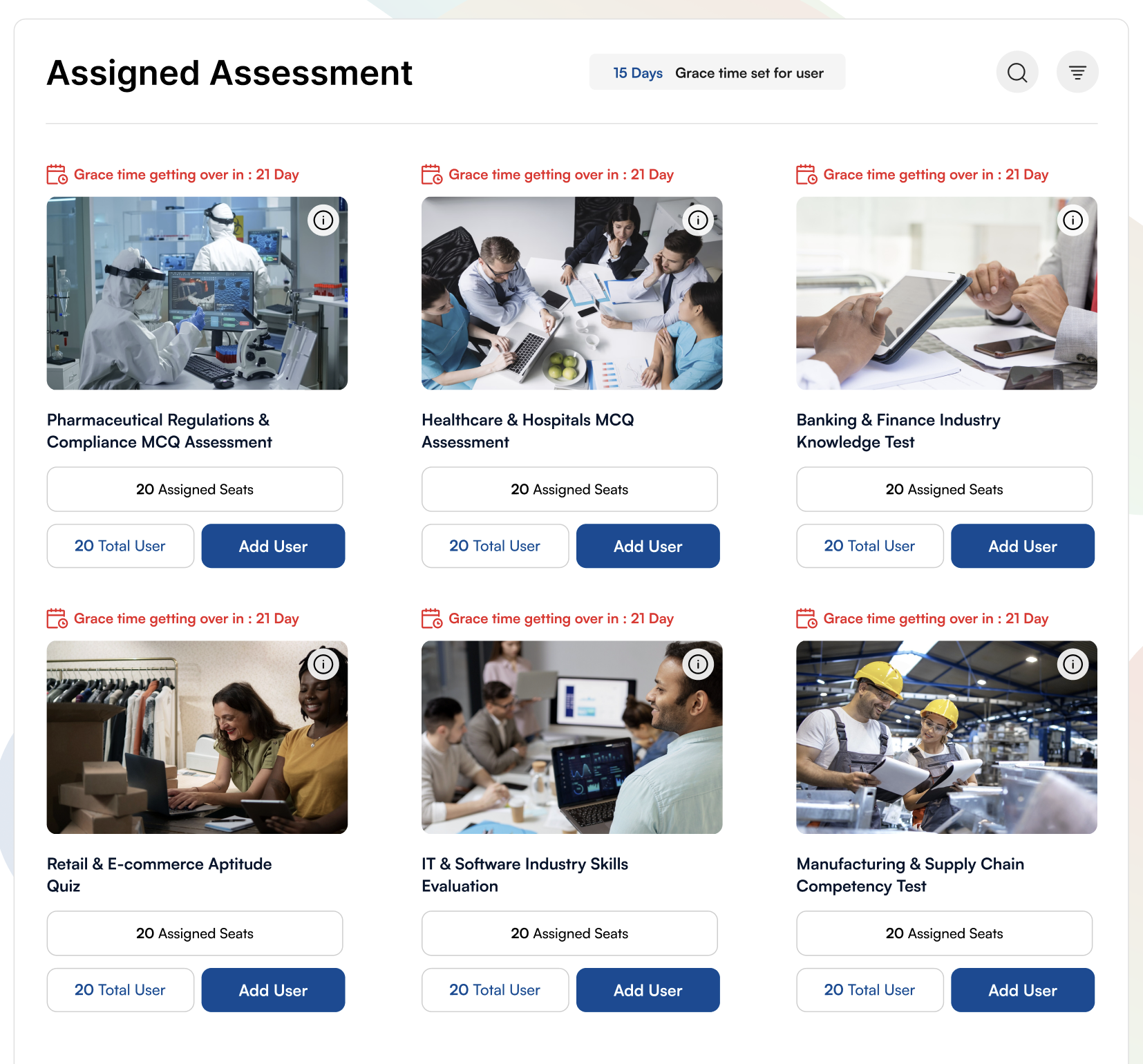
Manage assigned assessments across different industry domains with grace time tracking, seat allocation, and user management. Monitor assessment assignments with visual grace time alerts and comprehensive user controls.

Grace time display at the top (15 Days Grace time set for user)
Grace time getting over alerts with countdown (21 Day warnings in red)
Industry-specific assessments with representative images
Multiple industry categories: Pharmaceutical, Healthcare, Banking & Finance, Retail, IT, Manufacturing
Assessment titles: MCQ Assessments, Knowledge Tests, Aptitude Quizzes, Competency Tests
Assigned Seats tracking per assessment (20 Assigned Seats)
Total User count display (20 Total User)
Add User button for each assessment to assign more users
Info icon for detailed assessment information
Visual card layout with industry-relevant images
Search functionality across all assessments
Filter options for organized view
Responsive grid layout for multiple assessments (3 columns)
Real-time seat availability tracking
User assignment workflow per assessment

AI-Powered Content Recommendations & Employee Requests

Review and approve AI-recommended content and employee learning requests with intelligent workflows. Manage content approvals with category filtering, credit value tracking, and batch approval capabilities.
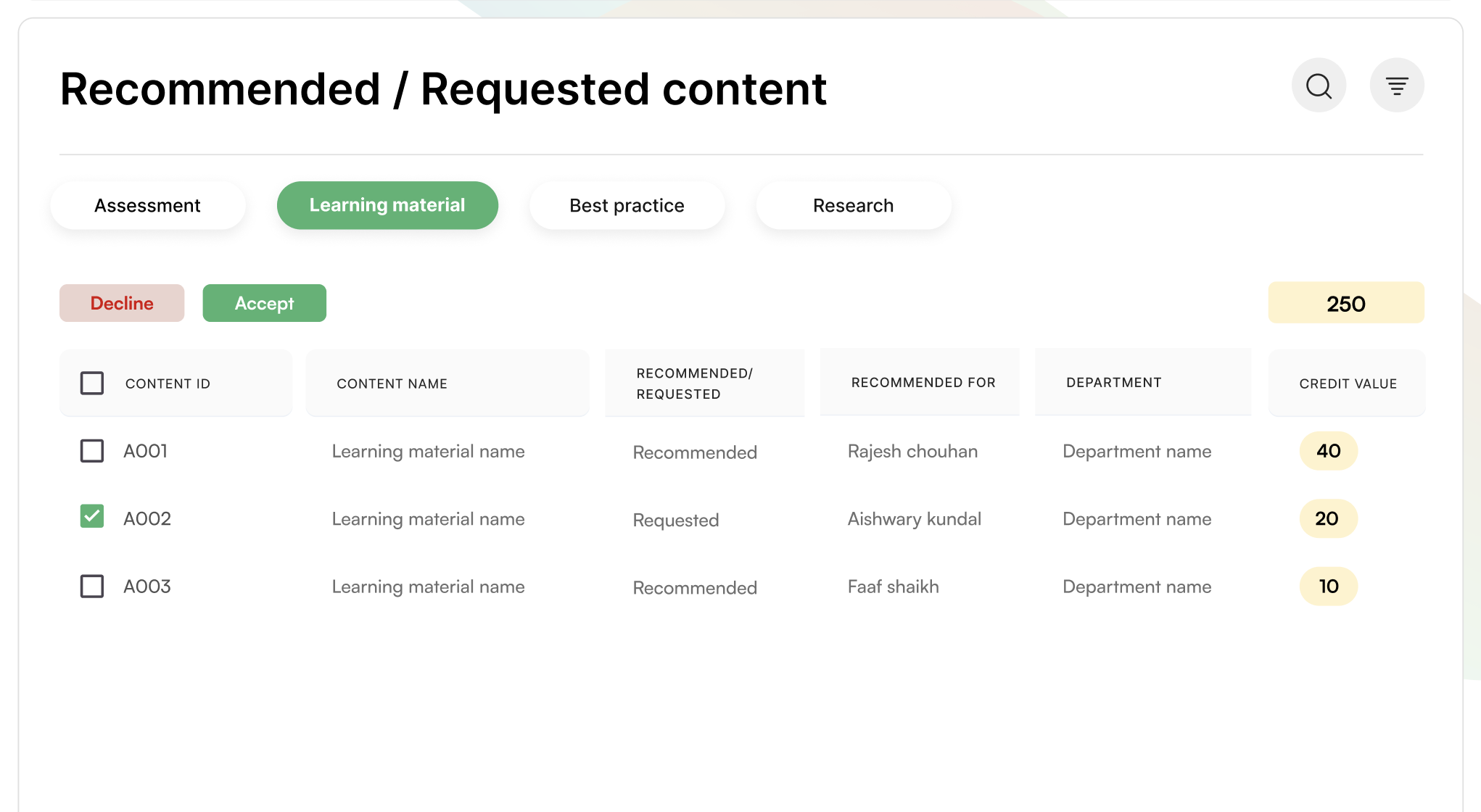
Category tabs: Assessment, Learning material, Best practice, Research
Decline and Accept buttons for batch approvals
Total credit value display (250 credits shown)
Content ID tracking (A001, A002, A003)
Checkbox selection for bulk operations
Content name display for easy identification
Recommended/Requested status column
Recommended for user name tracking (Rajesh chouhan, Aishwary kundal, Faaf shaikh)
Department name association
Credit value per content item (40, 20, 10 credits)
Search functionality for finding specific content
Filter options for organized content management
Accept status indication with green checkmark for approved items
Visual highlighting with yellow credit value badges
Streamlined approval workflow for efficiency
AI-Powered Content Recommendations & Employee Requests

Additional Organization Capabilities

Comprehensive tools and features to customize and optimize your learning platform for maximum effectiveness.

Role Management

Define and manage user roles with granular permissions

Create custom roles
Assign permissions
Manage role hierarchies

License Management

Track and manage licenses across your organization

Monitor license usage
Renew licenses
Allocate licenses

Module Customization

Customize learning modules to match your needs

Configure modules
Set module rules
Customize workflows

API & Integrations

Integrate with external systems and services

RESTful APIs
Webhook support
Third-party integrations

Audit & Compliance

Maintain compliance with audit trails and reports

Track all activities
Generate audit reports
Ensure compliance

Security & Access

Enterprise-grade security and access controls

SSO integration
Two-factor auth
Access controls

Calculate Your Learning ROI

Discover the potential savings and return on investment for your organization with our comprehensive ROI calculator.

Input Fields

Results

Potential Savings
$0
ROI
0%
Total Time Saved
0 hours
Total LMS Investment
$0

Calculation Assumptions: Savings are estimated based on 20% reduction in training costs, 30% time saved through efficient learning, and improved employee retention. Actual results may vary based on implementation and usage patterns.

Ready to Customize Your Learning Platform?

Take full control of your learning ecosystem with comprehensive organization management tools. Manage departments, users, assessments, and content with ease.

Stay Updated with Learning Insights

Get the latest updates on AI learning, new features, and industry trends delivered to your inbox.

We respect your privacy. Unsubscribe at any time.